

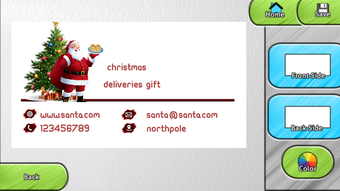
Description
Download Business Card Maker & Designer APK – Free Business Card Templates, Design Tool, Android App
Overview
Business Card Maker & Designer is a free Android application developed by Mitz Apps Game Studio, designed to simplify the process of creating professional business cards. The app falls under the Multimedia category, specifically within Graphic & Design, and is tailored for users who need quick, customizable business card solutions. It caters to a broad audience, including students, employees, entrepreneurs, and small business owners who require a convenient way to design and share their contact information. The software provides access to thousands of pre-designed templates and layouts, allowing users to choose a style that matches their personal or professional brand. With an intuitive interface, users can customize text, colors, fonts, and layout elements directly on their mobile device. The app enables real-time editing and instant sharing, making it ideal for networking events, job interviews, or promotional activities. Although the developer did not provide additional details about the app’s underlying architecture or advanced features, its core functionality focuses on accessibility and ease of use. The app is available exclusively on the Google Play Store, ensuring a secure distribution channel for Android users.
Key Features & Capabilities
- Thousands of Templates – Access to a vast library of customizable business card designs for various professions and purposes, including students, professionals, freelancers, and business owners.
- Real-Time Editing – Modify text, fonts, colors, and layout elements instantly using a touch-friendly interface without needing external tools.
- Customization Tools – Includes options for adjusting background images, adding logos, selecting borders, and fine-tuning spacing to match personal or brand identity.
- Save & Share – Users can save their designs locally and share them via messaging apps, email, or social media platforms for easy distribution.
- Offline Functionality – The app operates without requiring a constant internet connection, enabling design work on the go.
These features make the app suitable for quick, on-the-spot design tasks. For instance, a student preparing for a campus job fair can select a template, input their details, and share the card with recruiters in minutes. Similarly, a small business owner can create a branded card for a client meeting without relying on a graphic designer. The app’s focus on simplicity and speed enhances productivity for users who prioritize efficiency over advanced design tools. While no specific performance metrics were provided, the app’s lightweight size suggests optimized resource usage for mobile environments.
User Interface, Workflow & Performance
The user interface of Business Card Maker & Designer is designed with simplicity and accessibility in mind. Navigation is straightforward, with a clean layout that organizes templates into categories based on profession and style. Users can browse through a grid of preview cards, tap to select one, and immediately begin editing. The workflow follows a logical sequence: select template → edit content → customize design → save or share. The app uses touch-based controls that respond predictably, minimizing user errors. Although the developer did not specify resource usage details, the 12.5 MB file size indicates a lightweight application that likely consumes minimal CPU and RAM during operation. Performance observations are based on general software behavior patterns, suggesting stable operation across mid-range Android devices. The app does not appear to require background processes or frequent updates, which contributes to consistent performance. Stability is further supported by its offline functionality, reducing dependency on network conditions. While no official benchmarks were provided, the app’s design suggests it is optimized for mobile use, prioritizing responsiveness over complex rendering. Overall, the workflow supports rapid creation with minimal friction, making it ideal for users seeking a no-fuss solution.
Compatibility & System Requirements
Business Card Maker & Designer is compatible with Android operating systems and was released on March 15, 2024. The app has a file size of 12.5 MB, indicating a compact installation footprint suitable for devices with limited storage. The developer did not specify exact system requirements, including minimum Android version, RAM, or processor specifications. As a result, compatibility information is partially provided, and users should verify device compatibility through the Google Play Store before installation. The app is designed for mobile use, meaning it is optimized for touchscreen interaction and smaller screen dimensions. No information was provided regarding support for tablets or other form factors. The absence of detailed hardware requirements means users should rely on standard Android device capabilities for expected performance. The app does not appear to require additional software or plugins, ensuring straightforward installation and setup. Overall, the software is intended for Android users seeking a portable, lightweight design tool without complex setup procedures.
Pros and Cons
Pros
- Free to download and use with no hidden costs
- Large library of customizable business card templates
- Intuitive interface suitable for beginners and non-designers
- Offline functionality allows use without internet access
- Fast creation and sharing process
Cons
- No detailed system requirements provided by the developer
- Limited customization depth compared to desktop design tools
- Dependent on Google Play Store for distribution
- May lack advanced export formats like vector files
- No information on update frequency or long-term support
FAQ Section
Is Business Card Maker & Designer available for free?
Yes, the app is available for free on the Google Play Store. There are no in-app purchases or subscription fees mentioned in the provided information.
Can I use the app offline?
Yes, the app supports offline functionality, allowing users to create and edit business cards without an internet connection.
What operating systems does it support?
Business Card Maker & Designer is designed for Android devices. The exact version compatibility was not specified by the developer.
Is the app safe to download?
As the app is distributed through the Google Play Store, it is subject to Google’s security screening process. Users are advised to download only from official sources to ensure safety.
Can I export my designs in different formats?
The provided information does not specify export formats. Users may be able to save images locally, but advanced formats like PDF or vector files were not confirmed.
Final Thoughts
Business Card Maker & Designer delivers a streamlined, accessible solution for users who need to create professional business cards quickly and affordably. Its strength lies in its vast template library, ease of use, and offline capabilities, making it a practical choice for students, freelancers, and small business owners. While it may not offer the depth of customization found in desktop design software, it compensates with speed and simplicity. The app’s lightweight design and free availability enhance its appeal for mobile-first users. Although some details like system requirements and update frequency are missing, the overall experience remains consistent with expectations for a mobile utility tool. For anyone seeking a no-frills, instant business card solution, this app stands out as a reliable option. Download Business Card Maker & Designer APK now and start creating your professional identity in minutes.
Guides & Tutorials for business card maker designer APK
How to install business card maker designer APK
- Click the Preview / Download button above.
- Once redirected, accept the terms and click Install.
- Wait for the business card maker designer APK download to finish on your device.
How to use business card maker designer APK
This software is primarily used for its core features described above. Open the app after installation to explore its capabilities.
User Reviews for business card maker designer APK 0
No reviews found





